Dark theme
Deep Sea theme for your Mac wallpaper dashboard
Dark teal water with a faint glow and warm orange charts.
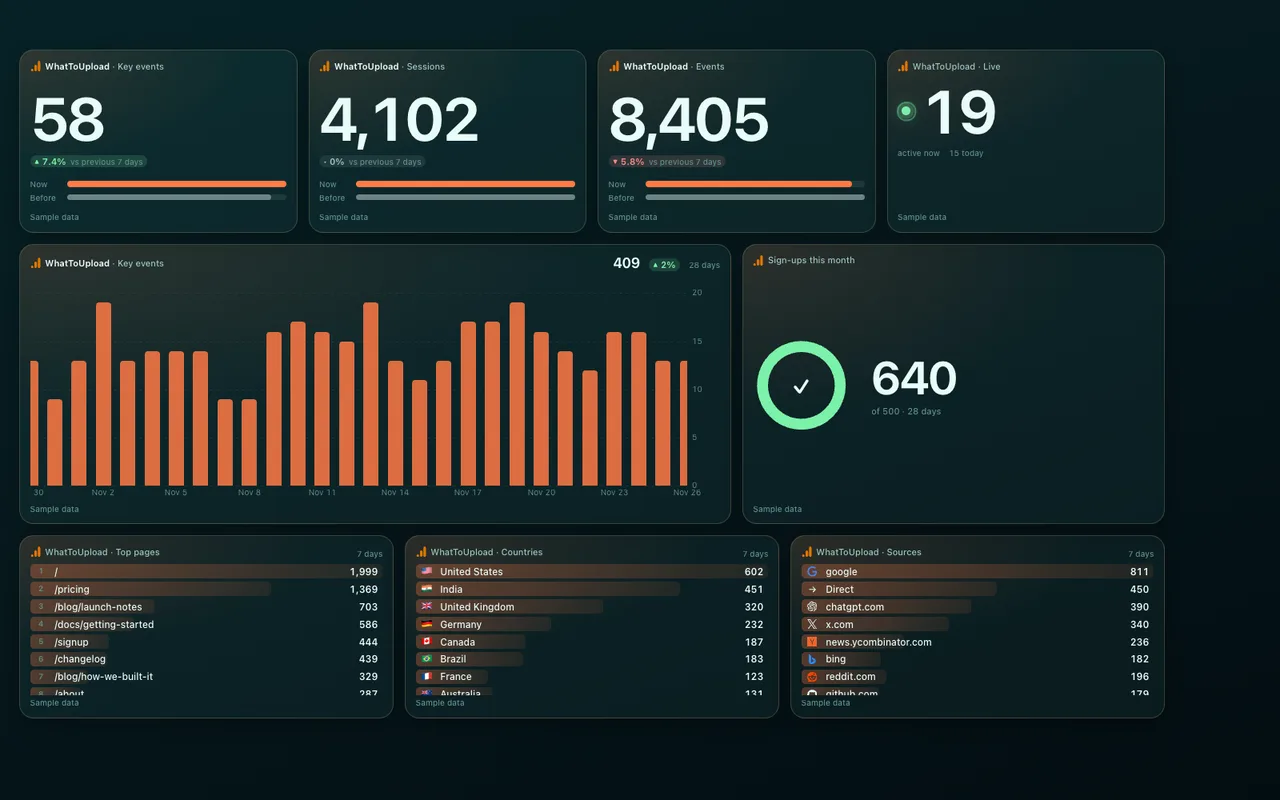
What Deep Sea looks like
- Appearance
- Dark
- Background
- Its own
- Type
- SF Pro, the system font
- Tile corners
- Rounded
#062226#06181D#030D11#E9FBF8#9CC7C1#5F8F8A#6EE7D8
How to use it
- Open Wallytics and choose Themes in the side panel.
- Every preview there is your own dashboard drawn in that theme. Pick Deep Sea.
- The wallpaper changes straight away. Each display can have its own theme.
Questions about Deep Sea
Which layouts work with Deep Sea?
All 14. A theme changes colours, type and the shape of the tiles. The layout and the numbers stay the same.
Does Deep Sea follow light and dark appearance?
Deep Sea is a dark theme. You can pair it with a light theme, and Wallytics switches between the two when macOS changes appearance.
Can I change the colours or the font of Deep Sea?
Yes. Each dashboard can take its own accent colour, its own background image and one of 17 fonts on top of the theme.
Is Deep Sea in every plan?
Yes. Every plan, and the 7 day trial, has all 49 themes.
Themes like this one
- MicrographicTiny monospaced labels on black with hairline rules, like instrument markings.
- MidnightNear black with a violet lead tile and soft glowing edges. The app's default dark look.
- NebulaPurple and magenta clouds behind translucent tiles.
- Ocean GlassBlue-tinted glass tiles over your own wallpaper.
- The 14 layouts
Download for Mac
Free for 7 days, the full app, no card. Then from $4.99, once.