Layout: Art
Poster: a art dashboard layout for your Mac wallpaper
A piece of art beside your numbers. Pick any Art theme and the picture follows it.
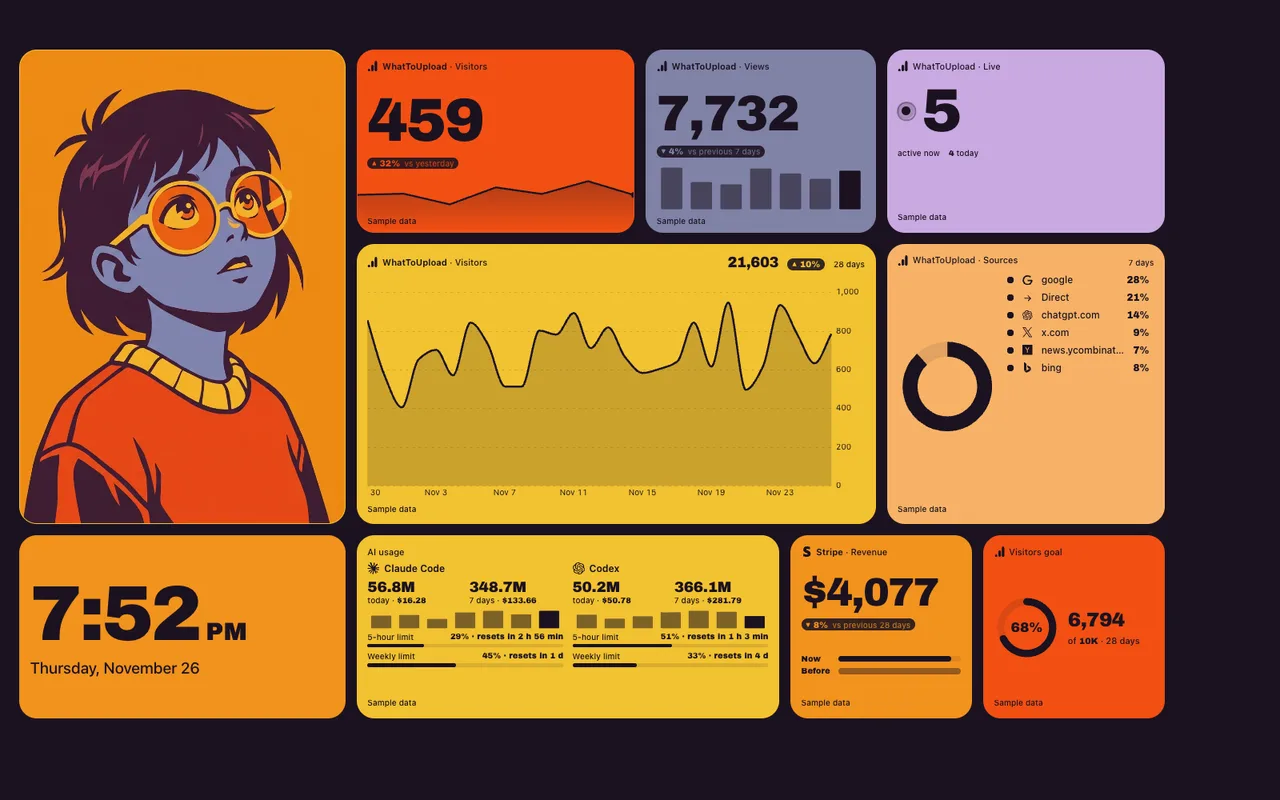
What is on it
10 widgets:
- 1 picture
- 1 clock
- 1 number with a sparkline
- 1 number with bars
- 1 live visitor count
- 1 trend chart
- 1 donut breakdown
- 1 AI token panel
- 1 number against last period
- 1 goal ring
How to use it
- Open Wallytics and choose Templates in the side panel.
- Pick Poster, then assign your own projects to its spots.
- Close the window. The dashboard sits behind your desktop icons and keeps itself up to date.
Questions about Poster
Can I change the Poster layout after picking it?
Yes. A layout is a starting point. In the layout editor you drag and resize widgets on a grid, add or remove them, and you can save the result as your own template.
Which themes work with Poster?
All 49. Poster opens in Pop Shade, and you can switch theme without touching the layout.
Can each display have a different layout?
Yes. Each display gets its own dashboard, with its own layout and theme.
Is Poster in every plan?
Yes. Every plan, and the 7 day trial, has all 14 layouts.
Other layouts
- AI usageTokens, estimated cost and limit windows for Claude Code and Codex.
- Chart wallFour big charts, each drawn a different way, with a thin strip of totals on top.
- Command centreEverything at once: sixteen tiles, three charts and a portfolio table, packed tight.
- Founder morningIs the business alive? MRR, cash in this month, new customers, where traffic came from, and the goal.
- The 49 themes
Download for Mac
Free for 7 days, the full app, no card. Then from $4.99, once.